
Assistive Technology
Assistive technology (AT) includes tools, devices, and software that help individuals with disabilities access information, communicate, participate in learning, and complete everyday tasks. These tools can range from built-in accessibility features on computers and mobile devices to specialized equipment and applications designed to meet individual needs. In educational settings, assistive technology can help remove barriers and provide students with greater independence and opportunities to participate in classroom activities. Understanding the different types of assistive technology can help educators recognize available supports and consider how technology can improve access to instruction and learning.
Assistive Technology in the Classroom
Assistive technology can support students in a variety of areas, including reading, writing, communication, mathematics, and organization. Some tools are available to all students through built-in device features, while others provide more targeted or individualized support.
Reading & Accessing Information
Assistive technology can help students access written information through text-to-speech, reading supports, and alternative ways of presenting content.
Examples include:
- Google Read&Write: Text-to-speech and other reading supports, with features varying by version.
- Select-to-Speak: A built-in Chromebook feature that reads selected text aloud.
- Read Aloud: A browser extension that reads digital text aloud.
- Reading Mode: Helps simplify the presentation of webpage content.
- Apple Speak Selection and Speak Screen: Built-in iPad and iPhone features that read onscreen text aloud.
Writing & Expressing Ideas
Assistive technology can help students organize ideas, produce written work, and demonstrate understanding using alternative methods.
Examples include:
- Speech-to-Text: Allows students to dictate text instead of typing.
- Google Read&Write: Offers additional writing supports, such as word prediction and speech-to-text, depending on the version.
- Google Keep and Google Tasks: Can support writing checklists, sentence frames, word banks, and organization.
- SnapType: Allows students to complete worksheets digitally.
Communication
Mathematics
Assistive technology can help students access mathematical information, complete calculations, and organize their work.
Examples include:
- Calculators and digital graphing tools.
- Number lines and manipulatives.
- Graph paper and enlarged worksheets.
- Desmos and other accessible mathematical tools.
Organization & Executive Functioning
Assistive technology can support students with planning, managing tasks, remembering information, and organizing their work.
Examples include:
- Digital planners, reminders, timers, and checklists.
- Google Keep and Google Tasks.
- Visual schedules and task lists.
- Digital organizers and other built-in device features.
Understanding CSD's Tiered Assistive Technology Supports
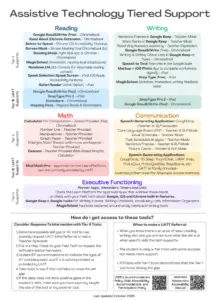
Canyons School District uses a tiered approach to help identify and provide assistive technology supports based on student needs. Some tools are readily available through classroom resources or built-in accessibility features. Other students may benefit from additional tools, specialized technology, or support from district assistive technology specialists.
CSD’s Assistive Technology Tiered Support resource provides information about:
- Assistive technology tools that support reading, writing, communication, math, and executive functioning.
- Tier II tools and strategies that can be implemented and evaluated.
- Tier III supports available through the Utah Assistive Technology Team (UATT).
- How to request assistive technology tools or additional support.
- Collecting data to evaluate whether assistive technology is meeting a student’s needs.
Employees should follow district procedures when requesting specialized assistive technology or determining appropriate supports for individual students.